All CNCs read g-code, but it can come in different formats. To ensure the g-code is tailored for your AltMill or LongMill, you must apply a post-processor in the CAM software, before you export g-code.
If you do not select the correct post processor, some issues you might encounter are:
- Errors while running the g-code file, stopping the job partway
- Machine cuts smaller than what you designed in the CAM software
Vectric VCarve/Aspire
Use Grbl (inch) (*.gcode) OR Grbl (mm) (*.gcode). DO NOT USE THE .tap OPTION.
Additionally, you can create a custom machine configuration file, which will automatically set the correct post processor every time you create a project.
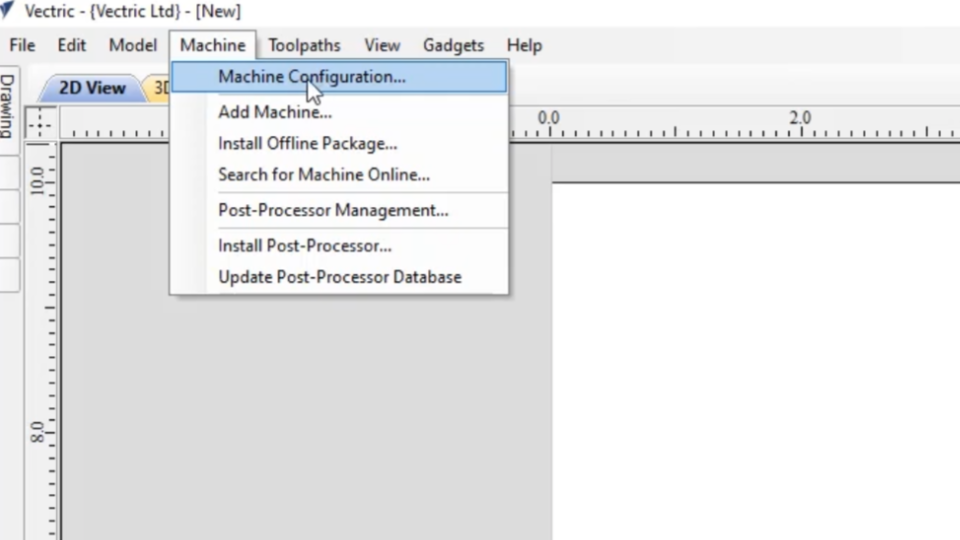
On Vectric, go to Machine at the top of the screen. In the drop down select Machine Configuration.
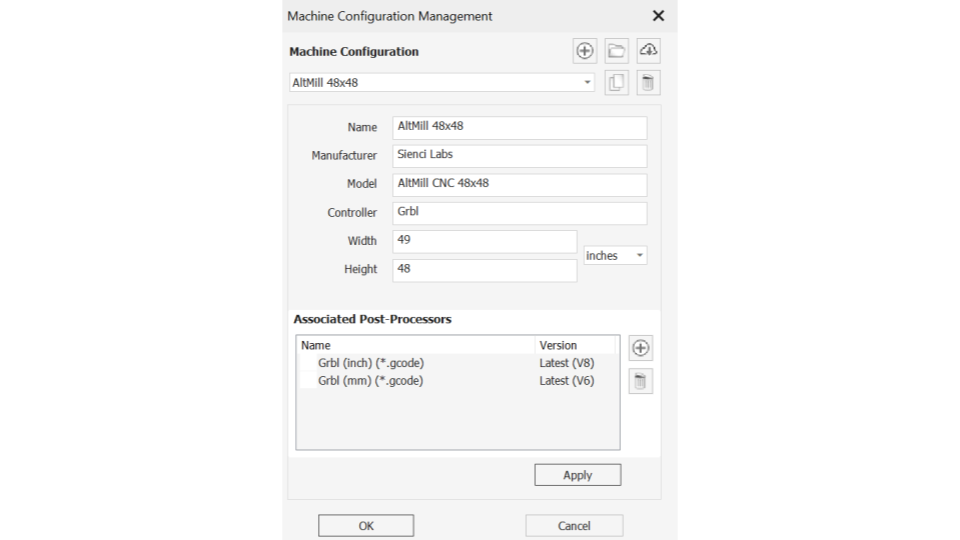
Fill out the Machine Configuration Management window with the following critical information.
| Name | AltMill MK1 or MK2 | LongMill MK1 or MK2 |
| Manufacturer | Sienci Labs |
|
| Model | 4x4 or 2x4 | 48x30, 30x30 or 12x30 |
| Controller | SLB-EXT | SLB |
| Width | Use cutting area found in this chart | Use cutting area found in this chart |
| Height | ||
| Acceleration (XYZ) | 1500 mm/s² | 750 mm/s² |
| Associated Post Processors | Grbl (inch) (*.gcode), Grbl (mm) (*.gcode) |
|
Fusion 360
Use GRBL as your post processor.
To avoid potential issues with Fusion 360, we also recommend you make the following checks to your post-processor:
- Change the ‘Safe Retracts‘ to “Clearance Height” and NOT “G28”. It will be obvious that you have this on if you don’t have limit switches or forget to home your machine and a the start of the job your bit plunges suddenly really deep into your material.
- Output M6 set as “No” (unless you plan to set up tool changing)
- Output Tool Number set as “No” (unless you plan to set up tool changing)
Post Processors for Various CAM Software
If you aren't using Vectric or Fusion360, refer to this table for post processors you can use with your AltMill or LongMill.
| CAM Software | Post Processor |
| Vectric Cut2D, Vectric VCarve, Vectric Aspire | GRBL (mm), GRBL (in) |
| Carveco Maker, Carveco Maker+ | UGS GRBL |
| Fusion 360 | GRBL |
| Easel, Easel Pro | No selection required |
| Carbide Create | GRBL |
| CAMLab | No selection required |
| ESTL Cam | No selection required |
| FreeCAD | GRBL (mm) |
| BobCAD/CAM | Custom: https://forum.sienci.com/t/cad-cam-software-post-processors/436/3 |
| Inventor CAM | GRBL (mm) |